fail2ban
The need
One month passed, one Hetzner invoice was paid, and now I’m allowed to ask for opening up ports 25 and 465 in order to get the mail server online. The process itself is straight forward in the Hetzner interface and the ports get unlocked in minutes … and .. in minutes, my logs start getting these kind of entries:
$ sudo grep "SASL LOGIN auth" /var/log/mail.log
2026-02-25T18:41:18.158208+00:00 mail postfix/smtpd[33067]: warning: unknown[103.81.170.109]: SASL LOGIN authentication failed: (reason unavailable), sasl_username=guest@chirila.me
2026-02-25T18:51:28.275339+00:00 mail postfix/smtpd[33115]: warning: unknown[178.16.55.50]: SASL LOGIN authentication failed: (reason unavailable), sasl_username=willies
2026-02-25T18:54:09.032736+00:00 mail postfix/smtpd[33126]: warning: unknown[103.81.170.109]: SASL LOGIN authentication failed: (reason unavailable), sasl_username=office@chirila.me
...
Like … just turning up and all kind of IPs are trying to log in. Now that I’m looking a bit better at it, looks like Nginx logs also have some funny entries:
$ sudo grep 404 /var/log/nginx/andrei.chirila.me.access.log
172.94.9.253 - - [25/Feb/2026:13:54:58 +0000] "GET /.git/config HTTP/1.1" 404 162 "-" "Mozilla/5.0 (Windows NT 10.0; Win64; x64) AppleWebKit/537.36"
172.94.9.253 - - [25/Feb/2026:13:54:58 +0000] "GET /admin/.git/config HTTP/1.1" 404 162 "-" "Mozilla/5.0 (Windows NT 10.0; Win64; x64) AppleWebKit/537.36"
172.94.9.253 - - [25/Feb/2026:13:54:58 +0000] "GET /private/.git/config HTTP/1.1" 404 162 "-" "Mozilla/5.0 (Windows NT 10.0; Win64; x64) AppleWebKit/537.36"
...
And going further … quickly checking ssh logs, it’s also full of … surprises:
$ sudo grep -E "sshd\[.*(Failed|Invalid)" /var/log/auth.log | tail
2026-02-25T19:27:08.240110+00:00 mail sshd[34002]: Failed password for root from 188.166.84.53 port 54922 ssh2
2026-02-25T19:27:18.636668+00:00 mail sshd[34008]: Invalid user admin from 167.71.140.121 port 39598
2026-02-25T19:27:20.183401+00:00 mail sshd[34008]: Failed password for invalid user admin from 167.71.140.121 port 39598 ssh2
2026-02-25T19:27:53.520626+00:00 mail sshd[34018]: Failed password for root from 188.166.84.53 port 59718 ssh2
...
The solution
At this point I’m just wondering: isn’t there something that can extract from
the logs the IP addresses and somehow block them … and I find
AbuseIPDB. Having a look, it seems like I can use
a straight off the shelf solution:
fail2ban - even open source :D
Straight on installation with:
$ sudo apt install fail2ban
Then enabling with jail.local a couple more jails: nginx-botsearch,
nginx-bad-request and postfix. This looks like:
[nginx-botsearch]
enabled = true
port = http,https
logpath = %(nginx_access_log)s

[nginx-bad-request]
enabled = true
port = http,https
logpath = %(nginx_access_log)s

[postfix]
enabled = true
filter = postfix[mode=aggressive]
maxretry = 3
bantime = 48h

[sshd]
enabled = true
action = %(action_)s
         %(action_abuseipdb)s[abuseipdb_category="18,22"]
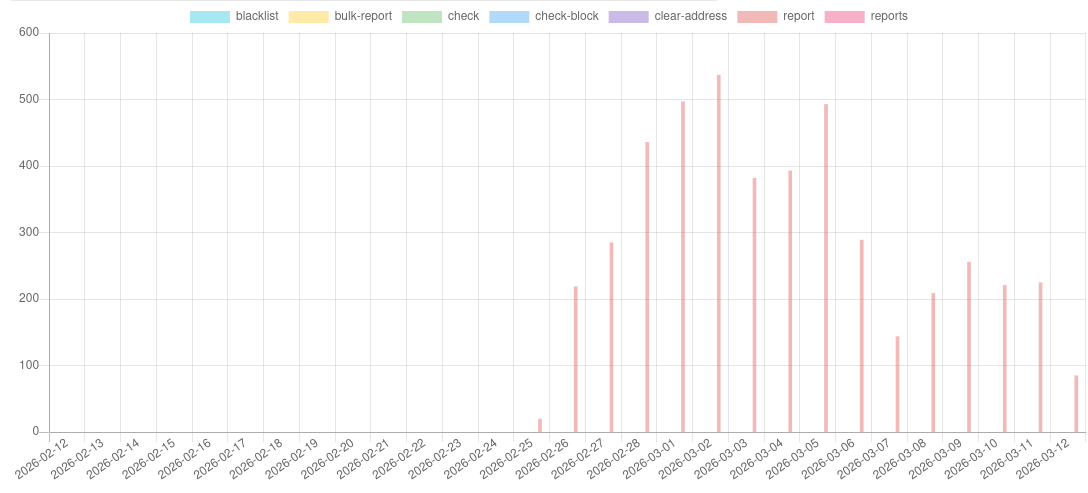
The ssh logs start flowing straight away, and I’m also able to see them in
the AbuseIPDB interface. But … only ssh reports were flowing in.
The knobs
Even on ssh, when trying to see if those IPs reported to AbuseIPDB have been
banned … surprise: no entries.
# ufs status
... crickets banned IPs ...
OpenSSH                    ALLOW       Anywhere
Postfix                    ALLOW       Anywhere
Nginx Full                 ALLOW       Anywhere
Dovecot Secure IMAP        ALLOW       Anywhere
Seems that the default action with which fail2ban is shipped is nftables, but
Ubuntu, or at least 24.04 that I have running, manages the firewall with ufw.
Straight forward fix, in jail.local, is adding banaction = ufw. Once that’s
in I can start seeing IPs being blocked:
$ ufw status | head
Status: active

To                         Action      From
--                         ------      ----
Anywhere                   REJECT      91.224.92.22               # by Fail2Ban after 2 attempts against sshd
Anywhere                   REJECT      45.148.10.152              # by Fail2Ban after 2 attempts against sshd
To postfix or to postfix@-
But still, that’s showing ufw blocking IPs only from the ssh jail while I
have configured 4. Turns out that the default configuration on Ubuntu for
postfix has journalmatch set to postfix.service. Trying to debug with
journalctl one sees fast:
# journalctl -u postfix.service -p warning --since yesterday
-- No entries --
So the right value on this particular system is postfix@-.service. Forking
it in /etc/fail2ban/filter.d/postfix.local fixed the issue.
# journalctl -u postfix@-.service -p warning --since yesterday
Mar 11 04:02:38 mail postfix/smtpd[313864]: warning: unknown[77.83.39.156]: SASL LOGIN authen>
Mar 11 04:02:44 mail postfix/smtpd[313864]: warning: unknown[77.83.39.156]: SASL LOGIN authen>
backend?
That pushed ufw status to show also IPs banned from Postfix logs, but there
was no record from Nginx, even though the logs were still having plenty of
entries that there were repeated attempts to access e.g. .php files.
The default fail2ban configuration comes with backend = systemd but … nginx
doesn’t log accesses to systemd, but to files, and I have configured each domain
to log to its own file. While the initial setup with
logpath = %(ngingx_access_log)s was supposed to work, turns out that per jail
one needs to set backend = auto to have the jail actually read the logs.
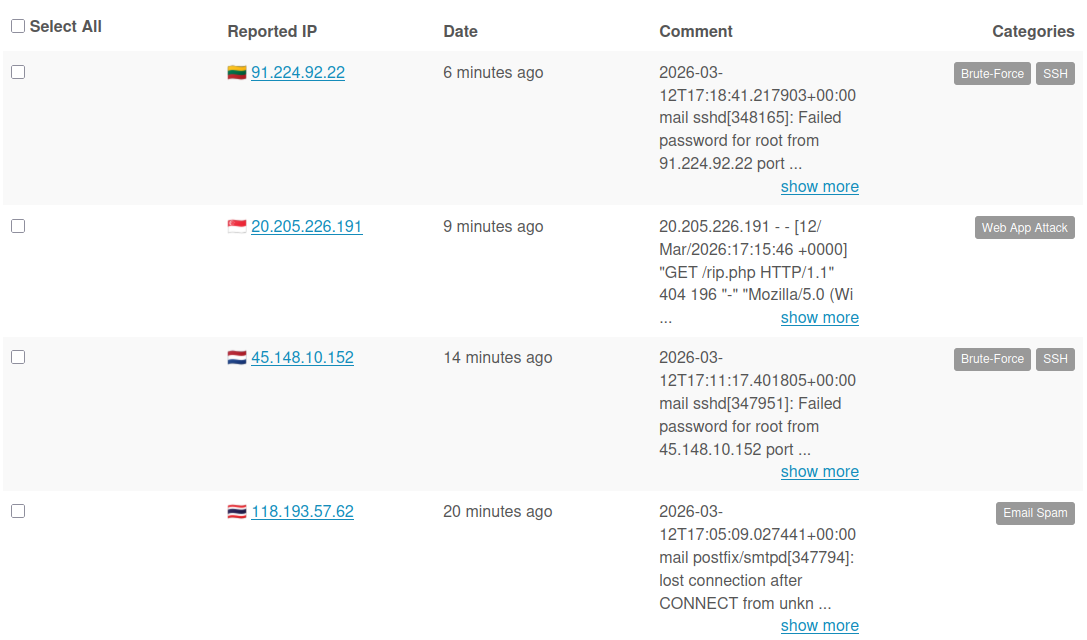
With the customization in, reports also started flowing in.
The end
This turned out a bit more complicated, setup-wise, than what I expected. On the other hand, I got to play with a couple of the fail2ban debugging tools and realized that in fact, debugging jail by jail, without rush, is totally doable.
In the process, I ended up also overriding some of the regexps for matching as
some entries in the logs (e.g. postfix NMTL or nginx 400s) were not matched and
also discovered that the initial version of the blog didn’t had robots.txt
configured … ups.
Useful for next time I need to dive into this:
- make your own overrides in
/etc/fail2ban/filter.d/jail-name.local fail2ban-regexp --print-all-missing sample-log-file "regexp"is your friendfail2ban-client reload jailfor quick iterations on the configuration, way faster than actually restarting the entirefail2ban.